The plus (or: the one thing on the feed that asks to be touched)
Path had one gesture people still remember: you pressed the plus in the corner and it bloomed. Five little discs fanned out, you picked one, and you were writing. Nothing about it was necessary. It was there because someone cared about the moment between wanting to say something and saying it.
Nah? has one piece of chrome on the feed besides the clock, and it is that plus. This week I spent a day taking the feed apart into annotated boards, the way a watchmaker lays out a movement, and the first board was the plus. This post is that board, more or less as it stands, because the ideas behind it are the ideas behind the whole app.
The disc
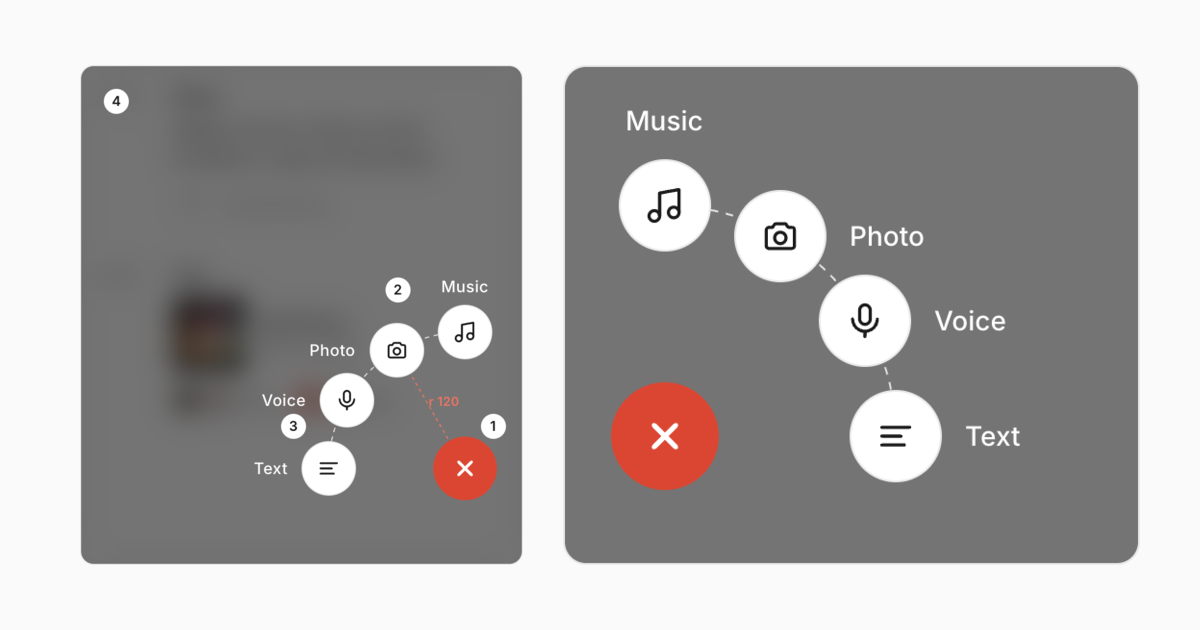
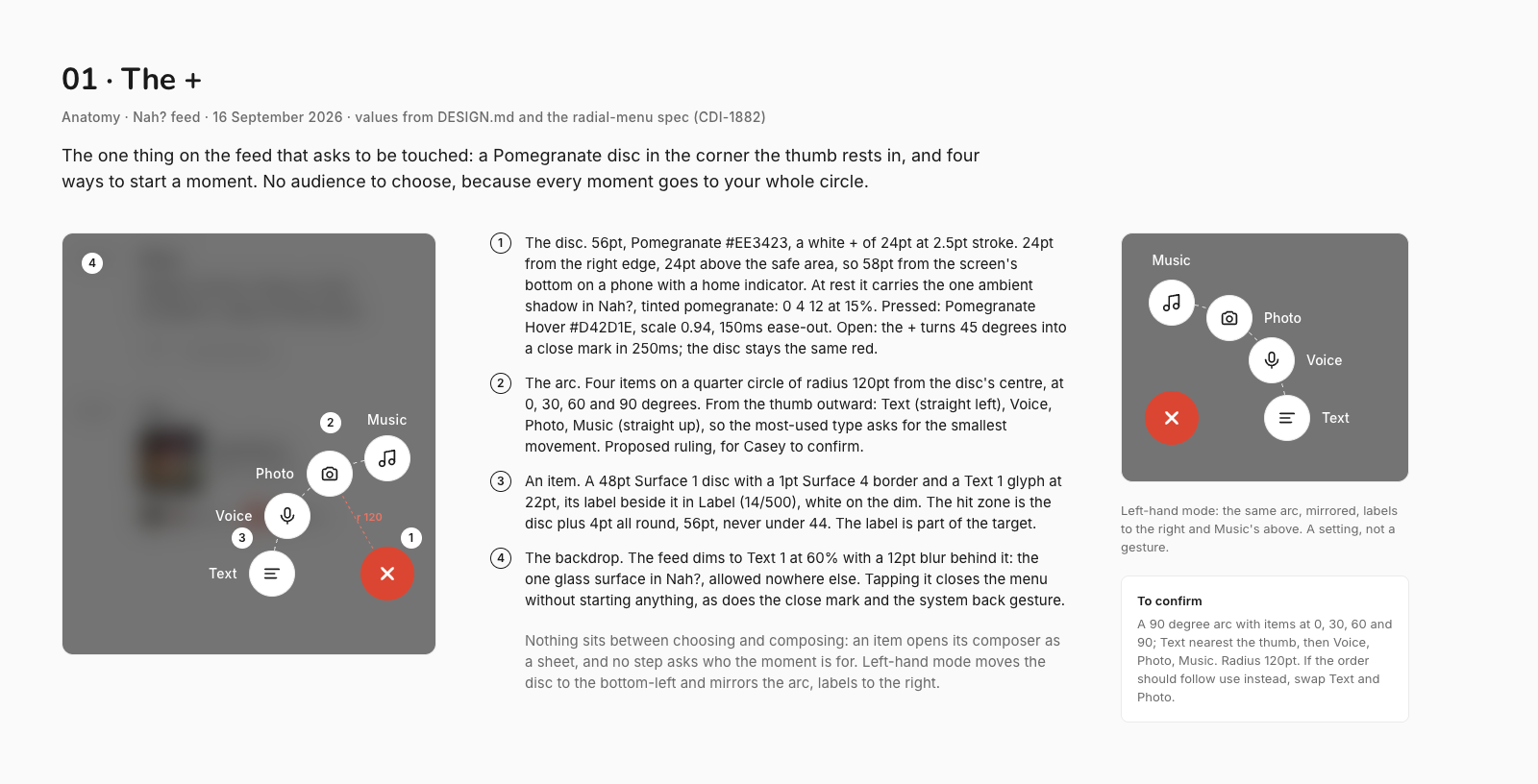
A 56 point disc in Pomegranate, our one red, with a white plus at 24 points. It sits in the corner the thumb already rests in: 24 points from the right edge and 24 above the safe area, so 58 from the bottom of a phone with a home indicator. It carries the only ambient shadow in Nah?, tinted the same red, so it reads as the one thing on the screen that is not lying flat.
Press it and it darkens a step and shrinks to 0.94, in 150 milliseconds, like every press in the app. Open it and the plus turns 45 degrees into a close mark. The disc stays the same red. It never becomes a different button; it is the same object, turned.
The arc
Four items on a quarter circle, 120 points from the disc’s centre, at 0, 30, 60 and 90 degrees. Text sits straight to the left, Voice above it, then Photo, and Music straight up. The order follows the thumb: moving sideways costs less than reaching up, so the type people use most asks for the smallest movement. That order is a proposal. If use turns out the other way round, Text and Photo swap and nothing else changes.
Each item is a 48 point white disc with a black glyph and its name beside it, white on the dimmed feed. The hit zone is 56 points and the name is part of it: you can tap the word.
The backdrop
When the menu opens, the feed dims to sixty percent and blurs twelve points behind it. That blur is the one glass surface in Nah?. Everywhere else the rule is flat, and I keep it flat, because the one time it appears it means something: the feed has stepped back, and the only thing in front of you is the choice of what to say.
Tapping the dim closes the menu. So does the close mark, and so does the system back gesture. Nothing was started, and the feed is exactly where you left it.
Nothing in between
Choose an item and its composer rises as a sheet. There is no step in between, because there is nothing to decide in between. Every moment goes to your whole circle. There is no audience picker, no “who can see this”, no toggle. The moment you would edit yourself for a room is the moment you start performing, and the plus is built so that moment never arrives.
How it moves
This is the part that took the longest to write down, because it is the part that has to feel right rather than be right.
Press, 0 to 150 milliseconds: the disc darkens and shrinks. No haptic yet.
Release, 0 to 250: the plus turns into the close mark and the dim rises with its blur. The four items leave the disc one after another, 30 milliseconds apart, Text first, each on its own spring along the arc.
Bloom, 250 to 400: the spring is on position only. Each item overshoots the arc by a hair and settles. Never a bounce, never on scale. The names fade in over the last hundred milliseconds.
Choose, 200 then 400: the item you tapped grows to 1.1 while the other three fall back into the plus. The composer rises on the same spring, the blur lifts, the dim stays under it. One soft haptic when the sheet lands. That is the first haptic in the whole sequence; opening the menu earns none.
Leave, 250: everything falls back faster than it came. Exits are always quicker than entrances.
With Reduce Motion on, the items simply appear in place, the dim appears without animating, nothing rotates and nothing overshoots. For VoiceOver the plus is a button called “New moment”, expanded or collapsed; focus moves to Text when it opens and back to the plus when it closes.
Left hand
A setting moves the disc to the bottom left and mirrors the arc, names to the right. Not a gesture, not a guess from how you hold the phone. A setting.
What it refuses
No audience step. No count of anything, anywhere near it. No badge on it, ever. No fifth item that does something clever. Four ways to say something to the people closest to you, and a disc in the corner that asks to be touched.
The board above is one of eight from this week. The others take apart where content sits on the feed, the clock that rides the time lane, what happens when you scroll, how you react to someone’s moment, and how a moment opens in focus. I will write those up as they settle.